WebGPU Viewer
JAXCAD provides two interactive WebGPU workflows: a standalone browser playground for editing complete Python scenes and a compact widget for Jupyter notebooks.
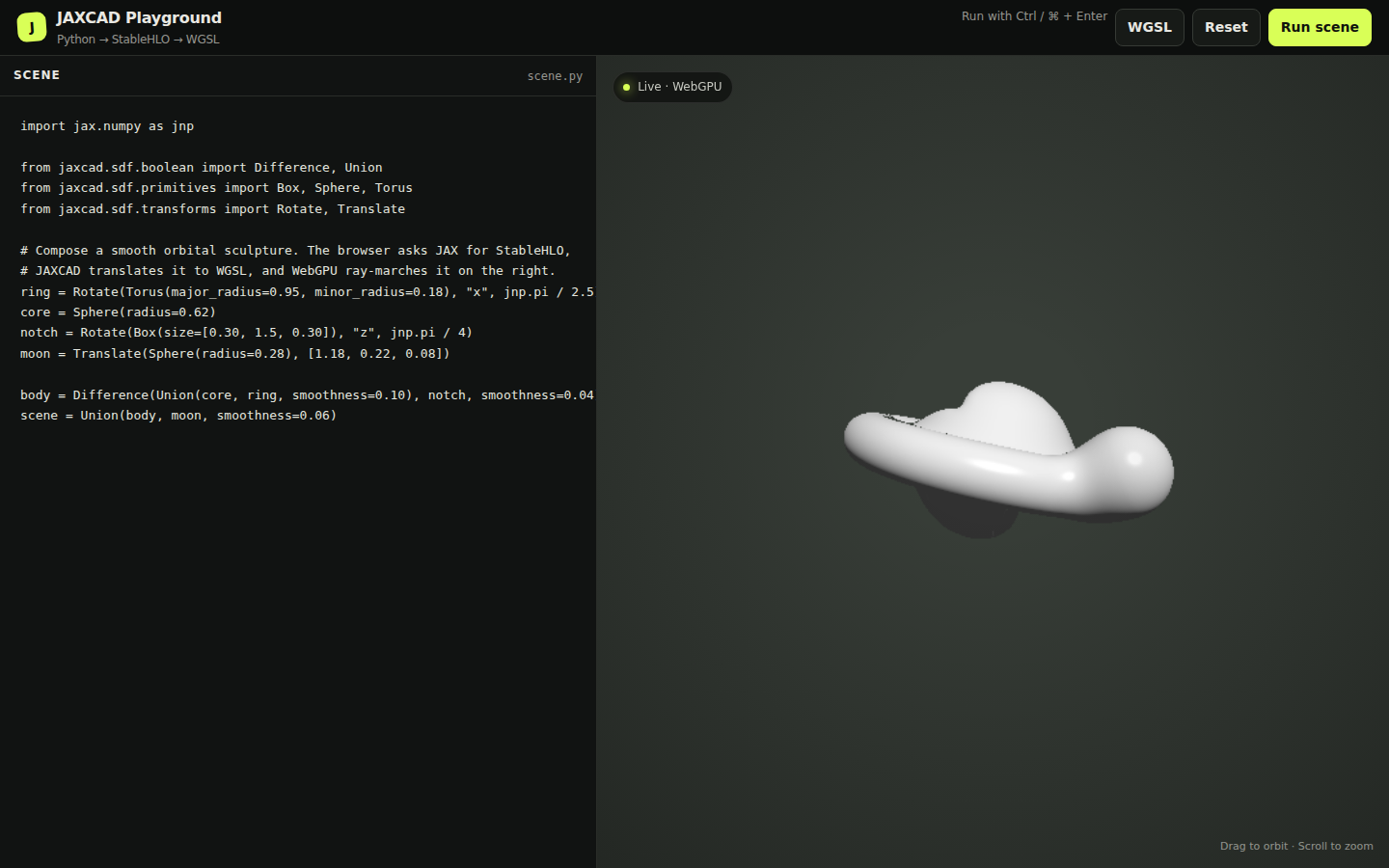
The canvas above is running the example scene directly in this page. Its shader was compiled from JAXCAD through StableHLO to WGSL; drag the scene to orbit it and scroll to zoom. The documentation is static, so editing and executing Python stays in the local playground described below.
Browser playground
From a development checkout, install JAXCAD and start the local viewer:
uv sync
uv run jaxcad-viewer --open
The module entry point works as well, and accepts a custom port:
python -m jaxcad.viewer.playground --open --port 9000The playground opens with a complete example. Edit the Python on the left and press Run scene or Ctrl+Enter (Cmd+Enter on macOS) to update the preview. The final SDF must be assigned to a variable named scene:
import jax.numpy as jnp

from jaxcad.sdf.boolean import Difference, Union
from jaxcad.sdf.primitives import Box, Sphere, Torus
from jaxcad.sdf.transforms import Rotate, Translate

ring = Rotate(Torus(major_radius=0.95, minor_radius=0.18), "x", jnp.pi / 2.5)
core = Sphere(radius=0.62)
notch = Rotate(Box(size=[0.30, 1.5, 0.30]), "z", jnp.pi / 4)
moon = Translate(Sphere(radius=0.28), [1.18, 0.22, 0.08])

body = Difference(Union(core, ring, smoothness=0.10), notch, smoothness=0.04)
scene = Union(body, moon, smoothness=0.06)
The viewer recompiles only when requested and redraws only after a scene, camera, or viewport change.
Controls
| Action | Control |
|---|---|
| Compile the editor | Run scene or Ctrl+Enter / Cmd+Enter |
| Orbit the camera | Drag in the preview |
| Zoom | Scroll in the preview |
| Restore the example | Reset |
| Inspect the complete generated shader | WGSL |
Compilation path
Each update follows the same path used by the shader backend:
- The local server evaluates the Python and reads
scene. - JAX traces the SDF and lowers it to StableHLO.
- JAXCAD translates StableHLO to a WGSL
sdffunction. - The browser builds a WebGPU pipeline and ray-marches the SDF.
Compilation runs in a separate child process with a timeout, so a failed edit does not take down the viewer server. Python tracebacks and WebGPU shader errors appear under the editor.
The playground executes the editor contents as Python on your computer. It binds only to localhost and protects compile requests with a per-session token, but it is not a sandbox. Only run code you trust.
Jupyter widget
Install the optional notebook dependencies:
pip install -e ".[viewer]"Then display any JAX-traceable SDF directly in a notebook:
from jaxcad.sdf.primitives import Sphere
from jaxcad.viewer import SDFViewer

scene = Sphere(radius=1.0)
viewer = SDFViewer(scene, height=480)
viewer
The notebook viewer supports orbit, zoom, pan, and camera reset. Recompile an existing widget after changing a scene without recreating its output cell:
viewer.update_scene(new_scene)See the WebGPU viewer notebook for a complete composition and hot-reload example.
Troubleshooting
WebGPU is unavailable
Use a WebGPU-capable browser and make sure hardware acceleration is enabled. The editor can still compile and show the generated WGSL when no adapter is available.
The command is not found
Run python -m jaxcad.viewer.playground --open, or reinstall the current checkout so the jaxcad-viewer console script is created.
A scene does not compile
Confirm that the source assigns a callable SDF to scene. The error panel includes the Python traceback or WGSL compiler message needed to locate the failure.